

When to label in bulk
If a batch of files all belong together, you don’t have to tag them one at a time. Select them, click Add or Change Labels above the file list, and apply changes to every selected file at once. This is the fast way to organize an import or sort a backlog.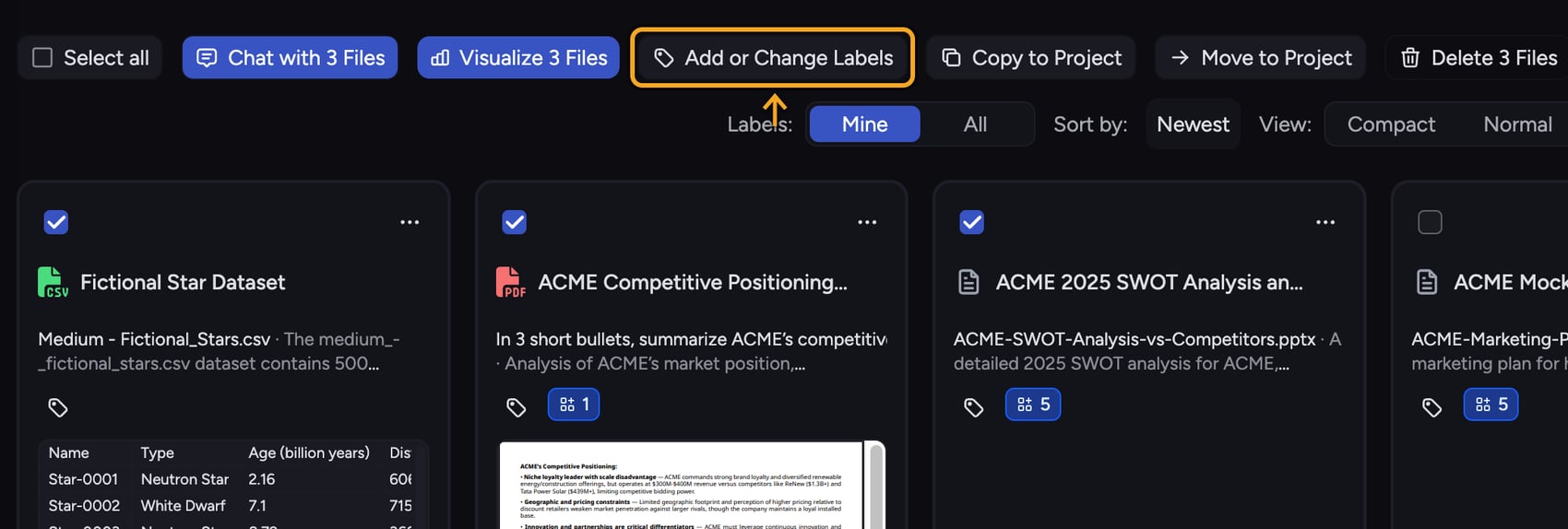
Select the files
- In your Library, select the files you want to label by ticking their checkboxes.
- As soon as at least one file is selected, a row of bulk actions appears above the file list. Click Add or Change Labels in that row. The picker’s header names how many files it will change.
Apply Labels across the selection
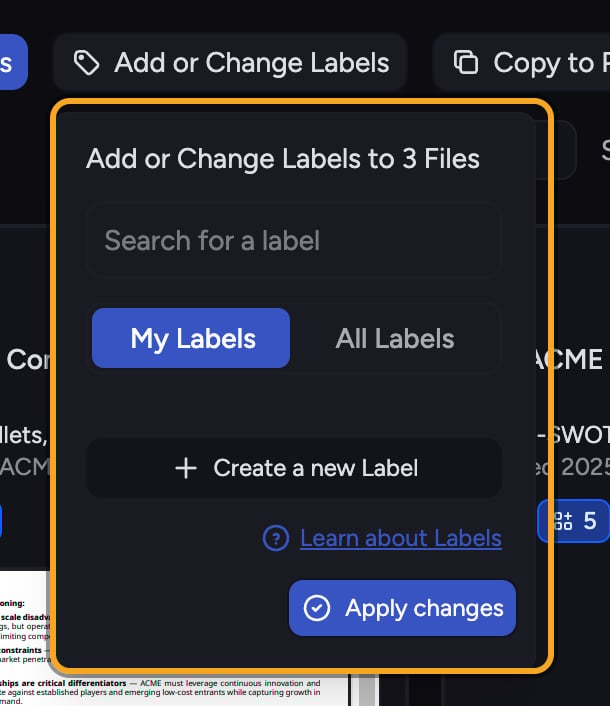
- In the picker, search for a Label in the search box, then click it to add it to every selected file. Click a selected Label again to remove it from the selection.
- A Label shown as partially selected means it’s on some but not all of the selected files. Click it to add it to all of them, or click again to remove it from all of them.
- Use the My Labels / All Labels scope toggle to switch between Labels you created and every Label available.
- Click Apply changes to write your additions and removals to all selected files.
ℹ️ Good to Know: A three-state Label (partially selected) reflects a mixed selection. Your first click resolves it the same way for the whole group, so check the state before clicking if you only meant to top up the files that were missing it.
Create a Label and apply it to everything selected
If you need a brand-new Label, create it from inside the bulk picker. Chief creates the Label and attaches it to every file in your current selection in one action.Frequently asked questions
What does a half-filled (partial) Label checkbox mean?
What does a half-filled (partial) Label checkbox mean?
It means the Label is already on some of your selected files but not all of them. Clicking it adds it to the rest; clicking again removes it from all of them.
I selected a lot of files — will bulk labeling still work?
I selected a lot of files — will bulk labeling still work?
Yes. Chief applies changes in batches behind the scenes (up to 100 files per request) and processes the rest automatically, so large selections are handled for you.
Does bulk labeling overwrite existing Labels on those files?
Does bulk labeling overwrite existing Labels on those files?
No. It only adds or removes the specific Labels you change in the picker. Any other Labels already on those files stay as they are.