

Delete a task thread
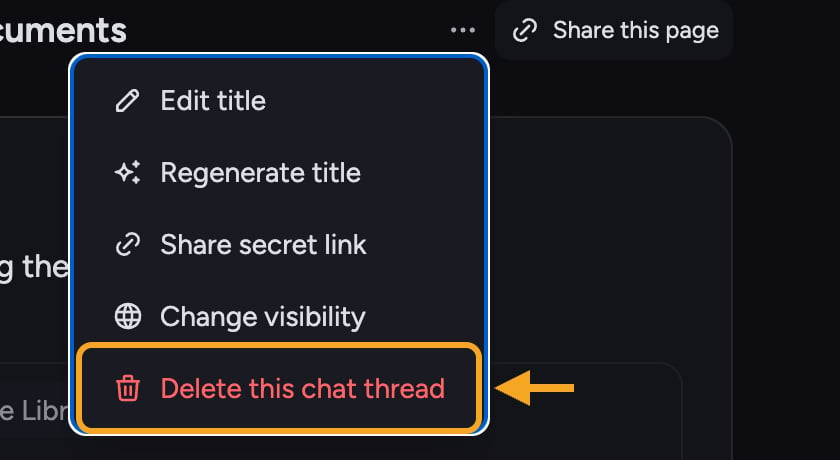
- Open the task. In the thread header, click the ⋯ (three-dot) Task actions menu.
- Choose Delete this task (the red trash item at the bottom of the menu).
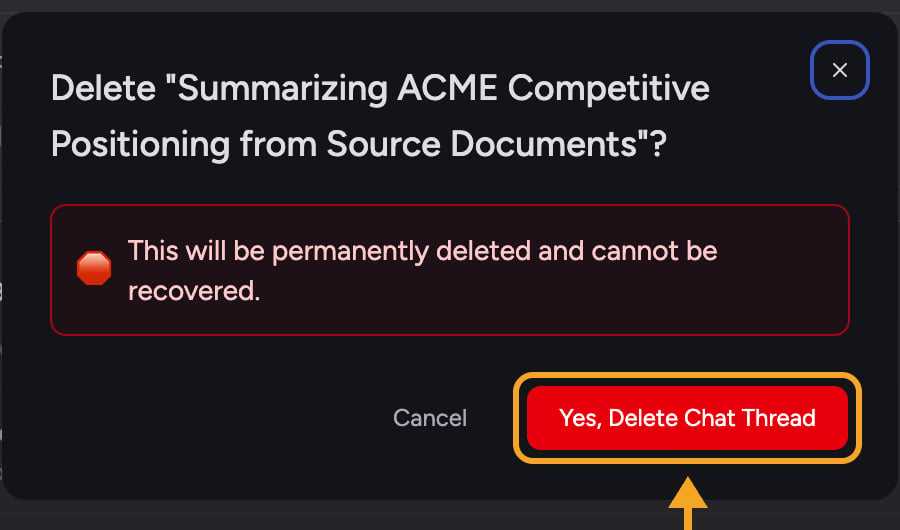
- A confirmation dialog opens, titled Delete “[task name]”?
- Read the warning, then click Yes, Delete Task. To back out, click Cancel or the X.
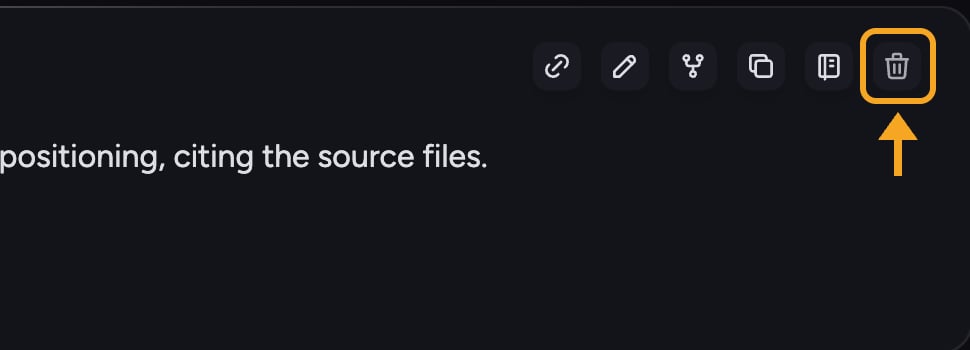
Deleting a single prompt instead of the whole task
FAQ
Why can't I delete my task right now?
Why can't I delete my task right now?
You can’t delete a task while it’s still generating a response. The dialog shows: “Cannot delete this task while a response is being generated. Please wait for the response to complete.” Wait for the answer to finish (or click Stop Generating), then delete — you’ll see a Delete later button in the meantime.
Can I recover a task I deleted?
Can I recover a task I deleted?
No. Deletion is permanent and can’t be recovered. If you’re unsure, rename or keep the task rather than deleting it.
The delete failed. What should I do?
The delete failed. What should I do?
If you see “Failed to delete task. Please try again,” it’s usually a temporary connection issue. Check the offline banner at the top of the screen, then try again.