

The intelligence levels and their cost
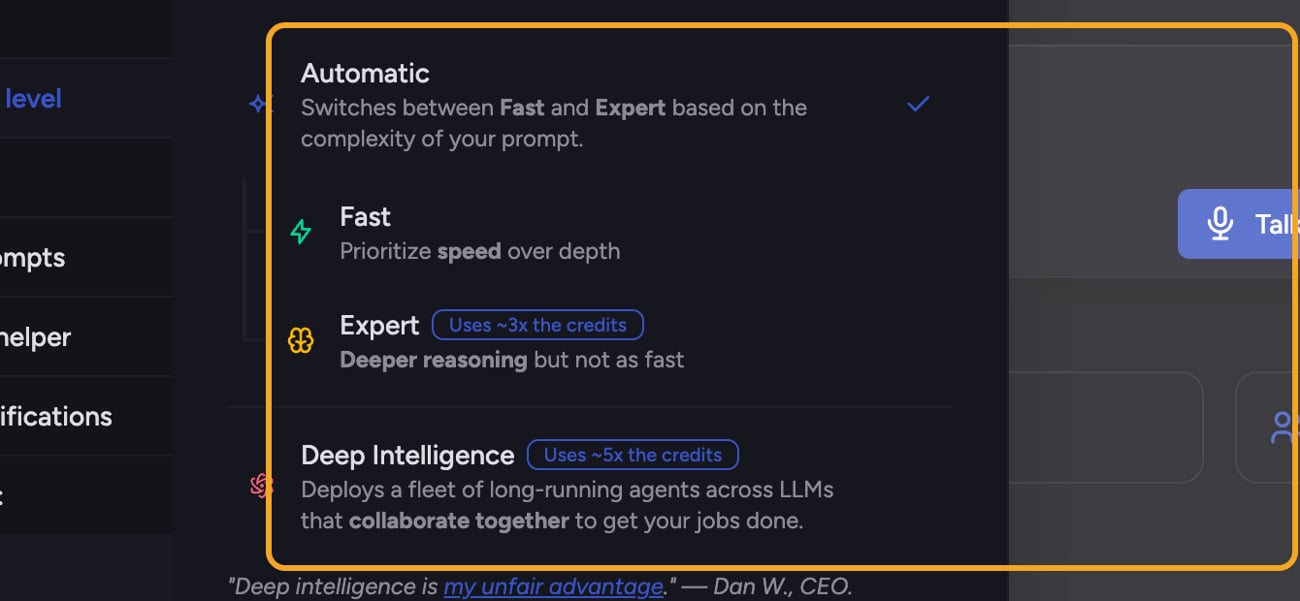
- Auto (Automatic) — Cost depends on the mode Chief selects. Automatic can route to Fast, Expert, or Deep Intelligence based on the prompt’s complexity.
- Fast — Baseline cost. Prioritizes speed over depth.
- Expert — Uses ~3x the credits. Deeper reasoning, but not as fast.
- Deep Intelligence — Uses ~5x the credits. Deploys a fleet of long-running agents across LLMs that collaborate to get bigger jobs done. Available on paid plans.
How to change the level for a task

- In the prompt bar, open the Intelligence level menu.
- Select the level you want. Each row shows a credit-multiplier badge (for example “Uses ~3x the credits”) for the paid levels.
- Send your prompt — it runs at the level you selected.
FAQ
Are the multipliers exact?
Are the multipliers exact?
They’re approximate guides — Chief labels Expert as “~3x” and Deep Intelligence as “~5x” relative to baseline. Actual usage varies with the length and complexity of each task. Use them to compare levels, not to predict an exact charge.
Why can't I select Deep Intelligence?
Why can't I select Deep Intelligence?
Deep Intelligence is a paid feature. On a free plan the row shows an “Upgrade” prompt instead of selecting it. Upgrade to a paid plan to unlock it.
I added an agent and now I can't switch to Fast or Expert.
I added an agent and now I can't switch to Fast or Expert.
Prompts that mention agents require Deep Intelligence. Chief blocks the lower levels and offers a link to remove the agents and switch back to Auto if you’d rather run a cheaper level.