

Tell the Chief team what to build or fix
Have an idea that would make Chief better, or hit something that isn’t working right? Email it with Get Help, which opens a message to support@chief.bot. Feedback and bug reports go straight to the team.Submit feedback or a feature idea
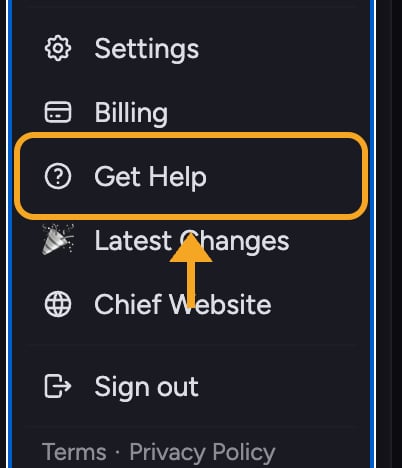
- Click Get Help — the question-mark help icon in the left navigation bar. It is also in your account menu.
- Your mail app opens a message to support@chief.bot.
- Describe your idea: what you want to do and why it would help.
- Send the email.
Report a bug
- Click Get Help to open an email to support@chief.bot.
- Describe the problem.
- List the steps to reproduce it, what you expected, and what actually happened.
- Note your browser and whether reloading the page helped.
- Send the email.
Send Live Sessions App feedback and logs
Use the Live Sessions App’s diagnostics report when a capture, transcript import, update, or other desktop workflow fails. It sends your description and recent app log to the Chief Support team.- Open the Chief Live Sessions App.
- Click the ? button in the bottom-right corner. Its tooltip says Send logs to support.
- In Need help or have suggestions?, describe the bug or feedback. Include what you did, what you expected, and what happened.
- Enter a contact email if the app does not already know your signed-in email.
- Click Send Logs.
Frequently asked questions
What is the difference between feedback and a bug report?
What is the difference between feedback and a bug report?
Feedback is an idea or request for something new or better. A bug report is something that is broken or behaving unexpectedly. Both go to the same support email; just say which one it is.
Will I get a response to my feedback?
Will I get a response to my feedback?
Not every idea gets an individual reply, but the team reads what comes in. For a bug, include your account email so the team can follow up if they need more detail.
I submitted a bug but nothing happened and I got no confirmation. Did it send?
I submitted a bug but nothing happened and I got no confirmation. Did it send?
Check your mail app’s Sent folder. If the report is not there, send it again when you have a stable connection.
Why is Send Logs disabled?
Why is Send Logs disabled?
Enter a description first. If the app asks for a contact email, enter a valid address so Chief Support can follow up.
The Live Sessions App couldn't send my report. What should I do?
The Live Sessions App couldn't send my report. What should I do?
Check your internet connection and click Try Again. If it still fails, email support@chief.bot and mention that the diagnostics upload failed.