

Where credits come from
- A welcome grant. When you register, you receive a one-time grant of free credits to get started. The grant is 10,000 credits.
- A daily refill (Explore). On the free Explore plan, your credits top up a little each day. The refill is 300 credits a day.
- Your plan’s monthly allowance. Pro and Power User include a large block of credits each billing period.
- Refills you buy. You can purchase more credits anytime. On paid plans you earn a bonus on every refill.
What makes credits go faster
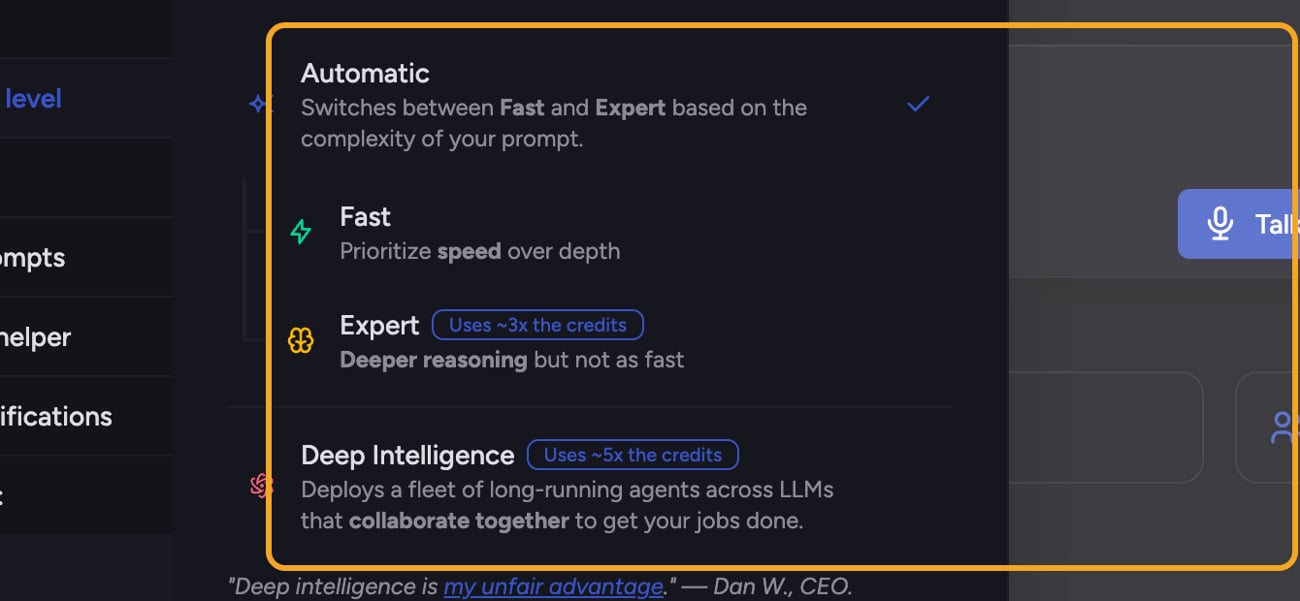
- Auto — Chief can route the task to Fast, Expert, or Deep Intelligence based on the prompt. Auto uses Deep Intelligence only when your plan includes it and the paying balance has at least 25,000 credits.
- Fast — Baseline cost. Prioritizes speed over depth.
- Expert — Uses ~3x the credits. Deeper reasoning, a bit slower.
- Deep Intelligence — Uses ~5x the credits. Deploys a fleet of long-running agents across LLMs that collaborate to finish bigger jobs. Available on paid plans.
Refill bonuses
When you buy credits on a paid plan, you get more than you pay for:- Current Pro — 15% on monthly billing or 25% on yearly billing.
- Grandfathered Pro v1 — 15% on either billing period.
- Power User — 25%.
FAQ
Why did one task cost so many more credits than another?
Why did one task cost so many more credits than another?
Because of the intelligence level. Expert uses about 3x the credits of a baseline request, and Deep Intelligence about 5x. If a task ran on a higher intelligence level — either because you chose it or Auto routed a complex prompt to Expert or Deep Intelligence — it spends more. The activity header shows the level used.
I ran out of credits mid-task. What happens?
I ran out of credits mid-task. What happens?
Chief stops and shows an “Out of credits” message with a way to refill. On Explore you can also wait for your daily refill. See What happens when you run out of credits for the full walkthrough.